D3DGear 4.4.1
Utilities 15.8 Mb Shareware
New Version: 4.4.1
_____________________________________________________
D3DGear is an advanced DirectX and OpenGL utility. It automatically measures Windows 3D game or application frame rate, and display frame rate on screen.
It helps you record 3D game into AVI movie while you are playing game, take multiple screenshots and conveniently save them. D3DGear also is a screenshot capture tool, it captures any game or application screenshot and save screenshot in popular image format.
To use D3DGear, simply launch D3DGear prior to start 3D game, the frame rate of 3D game will be automatically measured and displayed on screen; capturing screenshot will be as simple as pressing pre-defined hotkey.
Features:
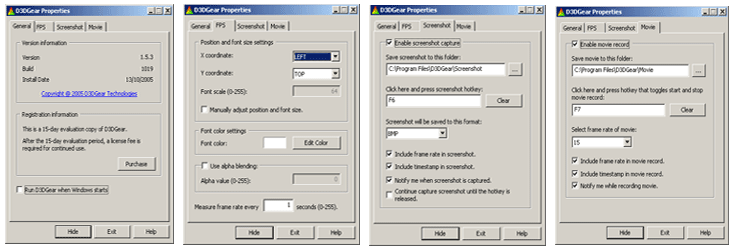
* Automatically measure game frame rate; display frame rate on screen.
* Customize frame rate position, size and color.
* Measure each game/application independently, simultaneously.
* Capture screenshot by pressing hotkey; automatically save screenshot to file.
* Save screenshot in file with BMP, JPG, TGA, PNG, PPM or HDR image format.
* Continually capture multiple screenshots until hotkey being released.
* Include frame rate in screenshot.
* Include timestamp in screenshot.
* Support both Windows DirectX9 API and OpenGL API.
* Support obsolete Windows DirectX8 game.
* Start run when Windows starts up.
Limitations:
15 Day Free Trial
System Requirements:
Win 98/Me/2000/XP/Vista/7
DirectX 9.0, OpenGL 1.2
DirectX9 compliant video card
Install and run with administrator privilege
_____________________________________________________
D3DGear is an advanced DirectX and OpenGL utility. It automatically measures Windows 3D game or application frame rate, and display frame rate on screen.
It helps you record 3D game into AVI movie while you are playing game, take multiple screenshots and conveniently save them. D3DGear also is a screenshot capture tool, it captures any game or application screenshot and save screenshot in popular image format.
To use D3DGear, simply launch D3DGear prior to start 3D game, the frame rate of 3D game will be automatically measured and displayed on screen; capturing screenshot will be as simple as pressing pre-defined hotkey.
Features:
* Automatically measure game frame rate; display frame rate on screen.
* Customize frame rate position, size and color.
* Measure each game/application independently, simultaneously.
* Capture screenshot by pressing hotkey; automatically save screenshot to file.
* Save screenshot in file with BMP, JPG, TGA, PNG, PPM or HDR image format.
* Continually capture multiple screenshots until hotkey being released.
* Include frame rate in screenshot.
* Include timestamp in screenshot.
* Support both Windows DirectX9 API and OpenGL API.
* Support obsolete Windows DirectX8 game.
* Start run when Windows starts up.
Limitations:
15 Day Free Trial
System Requirements:
Win 98/Me/2000/XP/Vista/7
DirectX 9.0, OpenGL 1.2
DirectX9 compliant video card
Install and run with administrator privilege
| About this file | |
|---|---|
| Developer | D3DGear Technologies |
| Homepage | http://www.d3dgear.com/ |
| File Size | 15.8 Mb |
| Date | |
| Operating Systems |
Windows XP Windows Vista Windows 7 |
| License | Shareware |
| Price | $34.95 |
